Encoder Grouping
Encoder grouping is used to collectively take attributes into the programmer.
Important
It is advisable to set the encoder grouping before creating a new show. That is, before generating presets. Particularly when using the function "Encoder Grouping" in the menu Auto Create Presets.
Important
Encoder groupings are non user-definable. That is, once created, they are valid for the entire show file.
How To Group Encoders
- Tap Setup -> Patch and Fixture Schedule
- Then tap Fixture Types on the right of the dialog EditSetup
- Tap Attribute & Encoder Grouping on the right of the dialog Fixture Types.
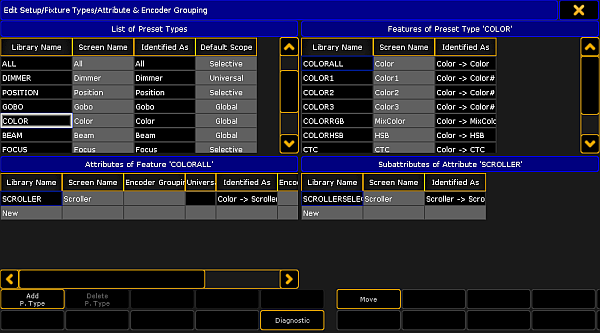
Attribute & Encoder Grouping
- The dialog Edit Setup/Fixture Type/Attribute & Encoder Grouping opens.
- To edit or create new encoder grouping:
-Choose a preset type in the List of Preset Types at the top on the left.
-After that, choose a feature in Features of Preset Type at the top on the right.
-Then tap and hold the column "Encoder Grouping" in Attributes of Feature at the bottom on the left.
-The pop-up Select Group opens.
-Choose one of the groups in this pop-up.
-To create a new group, scroll down and tap New Group.
Hint
Many attributes are already grouped, for example the function pan and tilt or RGB.
Pan and tilt is grouped since the position a fixture occupies has two directions.
RGB is grouped, because the color consists of a mixture between red, green and blue.

Source: key_of_encoder_grouping.html (grandMA2 manual v3.9)