Mirror Ports of the MA Network Switch
In port mirroring, the entire traffic that arrives at a port is mirrored onto a mirror port of the MA Network Switch.
Port mirroring is most commonly used in debugging or for the analysis of the network traffic such as the network load.
Important
The MA Network Switch mirrors several source ports to one destination port. Vice versa, it is possible to set a single destination port at a time.
Requirement:
To mirror ports:
- Open the MA Network Configuration:
-Press Setup and tap Network MA Network Configuration.
-The window MA Network Configuration opens.
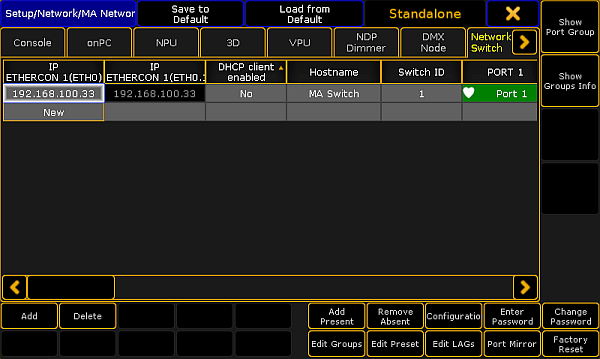
MA Network Configuration – Network Switch
- Tap Network Switch.
- Tap a cell in the row of the MA Network Switch you would like to edit and tap Port Mirror.
-The pop-up Configure MA Network Switch Port Mirrors opens.
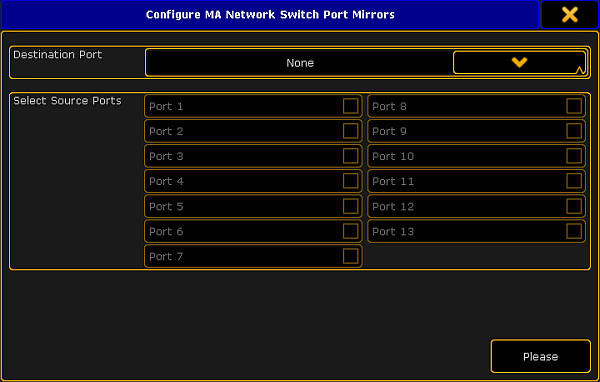
Mirror ports
- Select destination port:
-Tap the button in the field Destination Port and select a port. - Select source ports:
-Check the checkboxes corresponding to the source ports. - After checking one or several source ports tap Please.
- The ports are now mirrored.
Hint
A port is never destination and source at the same time.
Source: key_control_ma_switch_mirror_ports.html (grandMA2 manual v3.9)