Presets
The problem
You've programmed 40 cues. In 15 of them the back wash is "deep blue". Then:
- in the venue the blue looks too purple, or
- the next venue has the DJ booth a metre further back, so every "DJ booth" position is off, or
- a broken wash is replaced by a different model whose colour mixing makes the same RGB values look completely different.
If each cue stores its own raw numbers (pan 34.2°, tilt 61.8°, R 12 G 0 B 100), every one of those cues has to be found and fixed by hand. Presets remove that job.
The idea
A preset is a named, stored setting for a group of attributes, such as "Deep blue", "DJ booth", "Gobo breakup" or "Narrow zoom".
The important part is what happens when you use a preset. If you apply a preset and store a cue, the cue doesn't contain the blue values. It contains a link to the preset. The manual mentions this only in passing (on the Delete presets page): delete a preset that's used in a sequence and "the link to the preset pool will be removed from the sequence", leaving the raw values behind.
Because of that link, fixing the preset once fixes every cue that uses it.
Re-focus "DJ booth" in the new venue, update the preset, and all the DJ-booth cues point at the new position. The cue sheets show the preset name rather than a number, which also makes your show much easier to read.
Interpretation
The official chapter opens with "presets allow fast access and standardized usage", which is true but undersells them. For most programmers the reason to use presets is that cues become references instead of copies, so the show survives change. "Fast access" is a nice side effect.
Preset types: one pool per kind of attribute
Presets are sorted into pools by preset type, matching the attribute groups of fixtures. The manual's glossary counts nine preset types; in the encoder bar they appear as Dimmer, Position, Gobo, Color, Beam, Focus, Control, Shapers and Video. Each numbered pool has a filter, so storing into the Color pool only takes the colour attributes from your programmer, even if you also moved the fixtures.
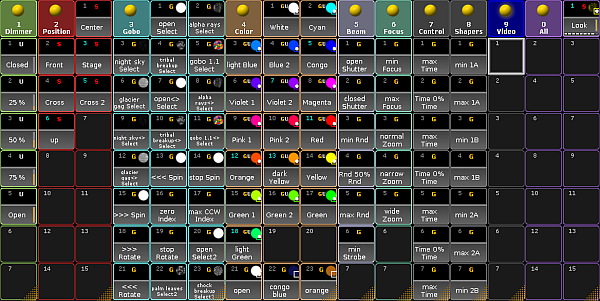
To verify in onPC: check 9
This is deliberate. It lets you combine presets freely: "DJ booth" for position, "Deep blue" for colour and "Breakup" for the gobo, all in one cue, each fixable on its own.
The All pool has no filter and stores whatever you give it, which is useful for complete looks but loses the "fix one aspect" benefit.
Selective, global, universal: who can use this preset?
A preset can be stored in three scopes. They answer the question: which fixtures does this preset have values for?
| Scope | Values stored for | Use it when |
|---|---|---|
| Selective (S) | each single fixture you stored it with | positions: every fixture needs its own pan/tilt to hit the DJ booth |
| Global (G) | a fixture type | the same setting is right for every unit of that model ("open white" on all Mac Auras) |
| Universal (U) | any fixture that has the attribute | generic things like "Dimmer 100%" or a basic colour across different models |
The trade-off: universal and global presets also work on fixtures you add later, while selective presets only know the fixtures they were stored with. ("Work on" means you can apply them to the new fixtures right away; existing cues still don't contain those fixtures, see Changing the rig after programming.) But "pan 30°" means the same setting on every fixture, not the same place on stage, so position presets are naturally selective.
Interpretation
The table's "use it when" column is common practice, not MA's wording. The manual only says presets help "especially when working with a show which is used in different locations", which is the same idea.
Preset references: making "red" look red on different fixtures
A universal "Red" sends the same values to every fixture, but different fixtures produce different colours from the same values (or use a colour wheel instead of mixing). A preset reference stored in the fixture type says "on this fixture type, the reference presets look like this". The manual singles out colour as the main use, "since the colors of every fixture and manufacturer may vary greatly". Preset references are also what the console's automatic preset creation builds on.
Presets inside presets
A preset can itself contain other presets (embedded presets, marked with an E). A "Breakdown look" preset might embed "DJ booth", "Deep blue" and "Breakup". Update "Deep blue" and the embedded preset follows. The links go all the way down.
Presets and movement effects
Position presets and movement effects work together:
- A relative effect (circle, sweep, figure-8) adds its movement on top of the current position. The position preset sets the centre, the effect moves around it. Update the preset in a new room and the movement follows.
- An absolute effect can use presets as its low and high values (sweep from "Stage left" to "Stage right"). It also follows when those presets are updated.
- Only an absolute effect with raw pan/tilt numbers has to be rebuilt when the room changes.
See Effects and chasers.
Breaking the link on purpose
Sometimes you want a cue to keep exactly its current values even if the preset changes later. The sheets let you remove the reference and keep the values (the values are copied into the cue), and the Extract keyword does the same for whole objects.
When you need it, and when you don't
- Moving lights: always use position presets, also as the centre or end points of movement effects. Positions are the thing that changes most between rooms and rehearsals.
- Colour on LED fixtures: use colour presets as soon as you want "the same blue" across more than one cue.
- A handful of dimmers, busked live: presets add little. Groups and faders are enough.
- One-off effects or a quick look you'll never change: raw values are fine.
The cost of presets is a little planning up front: you build the palette first (often with Auto Create), then program with it. The benefit grows with every cue you write.
Related
- The programmer: presets are applied in the programmer like any other value
- Cues, sequences and tracking: what a cue stores
- Reference: Create presets, Update presets, Auto create presets, Preset pools
Sources
- What are presets: universal/global/selective
- Delete presets: presets in sequences are links
- Looking at the cue content: remove a preset reference but keep values
- Extract keyword: breaking references recursively
- Create presets: preset pool filters, the All pool
- Preset pools
- Create preset reference
- Embedded presets