Create Preset Reference
A preset reference is very handy when it comes to color presets since the colors of every fixture and manufacturer may vary greatly.
Requirement:
- Presets have already been created.
To create preset reference:
- Press Setup.
- Tap Auto Create.
- The dialog Auto Create opens.
- Then, tap the tab Create Preset Reference.
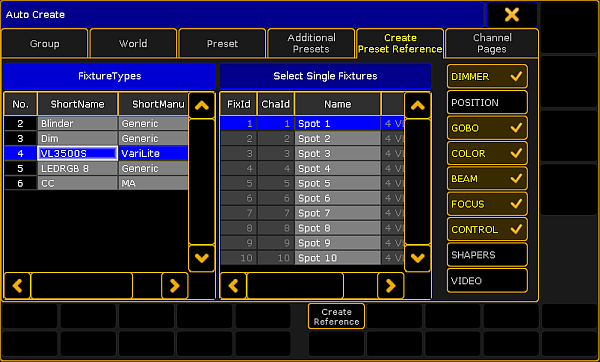
Create preset reference
- Choose a fixture type in the table FixtureTypes.
- Next, tap a fixture as reference for your preset in the table Select Single Fixtures.
- After that, select the preset types, on the right of the dialog, to which the reference is to relate.
- Eventually, tap Create Reference.
- The preset reference has now been created in the fixture type within this show file.
Important
To use preset references in other show files, export the fixture type after creating the reference.
- To close the menu, tap
 in the upper right corner of the window.
Source: key_presets_create_preset_reference.html (grandMA2 manual v3.9)