Set Key
The key Set is located in the command area below the key Up.
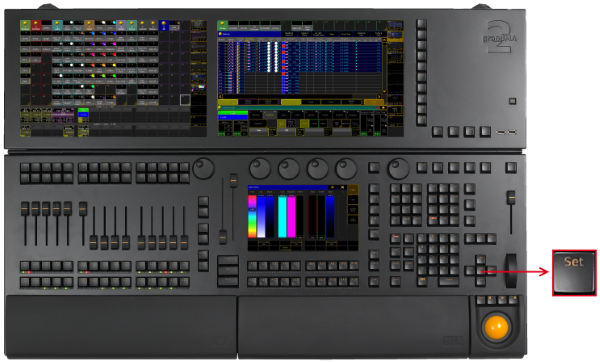
Location Key Set
Key Set as the Key Enter
If a pop-up dialog is open, for example the pop-up Choose store method, the key Set has the function of the key Enter.
- Pressing Set confirms the selected button in the pop-up.
Key Set and MAtricks
- Pressing Set enables and disables the MAtricks settings.
[time] : Executing : MAtricks Toggle
If the MAtricks button is green, the MAtricks are enabled.

Encoder Bar - Enabled MAtricks
- Pressing and holding Prev + Set executes the MAtricksInterleave -.
[time] : Executing : MAtricksInterleave -
- Pressing and holding Next + Set executes MAtricksInterleave +.
[time] : Executing : MAtricksInterleave +
- Pressing and holding MA + Prev + Set executes MAtricksBlocks -.
[time] : Executing : MAtricksBlocks -
- Pressing and holding MA + Next + Set executes MAtricksBlocks +.
[time] : Executing : MAtricksBlocks +
For more information see MAtricks.
Key Set for Adjustment of Monitor Wing Angle
To manually adjust the monitor wing angle, release the torque of the monitor wing engine.
- Pressing and holding MA + Set.
Source: key_key_set.html (grandMA2 manual v3.9)